How to join a Content Rewards campaign
A 6-minute read. Updated .
Make a free Content Rewards account (you must be 18 or older), open a campaign and press Join Campaign, or apply if it reviews clippers first. Connect the TikTok, Instagram or YouTube account you will post from in Settings, then post your clip on that account and press Submit clip on the campaign within 30 minutes. The campaign reviews it, and approved views are paid in rounds about every 10 days.
Make a free account
Sign up on contentrewards.com. You must be 18 or older, and each person may have one Content Rewards account. Content Rewards runs its own app now; Whop only comes in when you withdraw money.
Find a campaign worth joining
Content Rewards lists its campaigns on its Discover page. HookBounty lists the same campaigns next to every other platform's, with the four numbers that decide what a clip earns in the same place on every page. What to look for in a campaign explains each one.
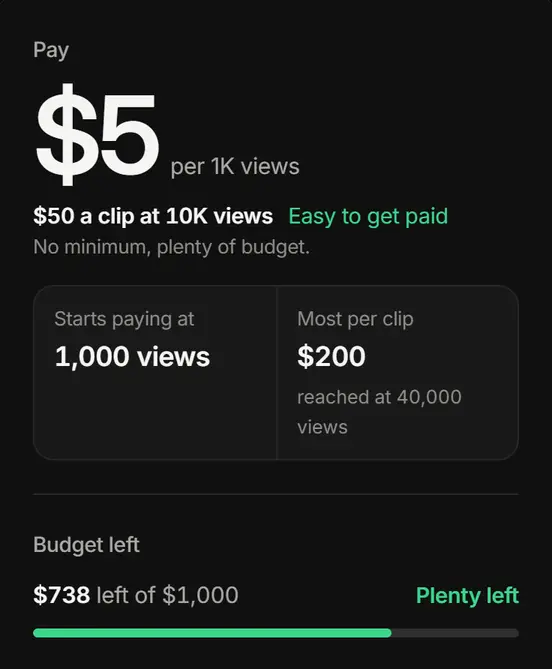
- Rate per 1,000 views. What approved views pay.
- Where pay starts. The views a clip needs before it earns.
- Most per clip. The cap.
- Budget left. What the campaign can still pay out.
Join, or apply
Open campaigns have a Join Campaign button. Some campaigns review clippers first: yours shows as Application pending, then changes to Submit clip if you're accepted or Not eligible if you aren't. Private campaigns are invite only.
After you join, read the brief again. The full rules, tags and files often only show once you're in.
Connect your social accounts
In Content Rewards, go to Settings, then Connected accounts, then Connect account. For TikTok, Instagram, YouTube and X you sign in on that app and approve the connection. Instagram has to be a business or creator account. Facebook works differently: you put a code in the caption of a public Reel and paste the Reel's link to verify.
Post on a public account
Post the clip on the connected account, set to public. Brands only pay for views they can see. Collab posts, such as an Instagram Collab with another account, aren't allowed unless the brief says so.
Making the clip itself: how to clip, step by step, or let AI do the editing: make AI clips from a YouTube link.
Submit within 30 minutes
Open the campaign, press Submit clip, paste the post's link into Submit video link, tick the box that says it meets the requirements, and press Submit clip. Content Rewards checks three things:
- It was posted from a connected, verified account.
- It hasn't been submitted anywhere before.
- It was posted in the last 30 minutes.

After you submit
The clip shows as pending until the campaign's own team decides. Content Rewards doesn't approve clips itself, and there's no fixed review time. On per-view campaigns, views count from when you submit, but nothing is set aside for you until the clip is approved.
Every submission gets a Bot Score from 0 to 100, a fraud-risk check the moderators see. It doesn't reject a clip on its own. If a clip is rejected you can appeal once, within 30 days, but you can't submit the same post again. A new post is fine. Why clips get rejected.
How you get paid
- Rounds. Earnings build for 7 days, then wait through a 3-day hold, so money arrives about every 10 days.
- How long a clip earns. Until 30 days after you submit it.
- The fee. Content Rewards keeps 10% on per-view campaigns.
- Withdrawing. From $1, your balance moves to Whop for free. From Whop to a bank or PayPal takes up to 5 business days, or is instant for a fee.
What a campaign's numbers mean in money: how clipping pay works.
See every Content Rewards campaign
Questions
Is Content Rewards part of Whop?
No. Content Rewards says it is an independent campaign marketplace run by Content Rewards Inc. It started on Whop and launched its own app in August 2026. Whop now only handles payouts, so your earnings move to a Whop balance when you withdraw.
How long does approval take?
There is no fixed time. The campaign's own team approves or rejects each clip, not Content Rewards. Content Rewards' terms say it may step in on a submission still pending after 7 days.
Can I resubmit a rejected clip?
Not the same post: once a post is rejected it can't be submitted to any campaign again. You can post a new clip and submit that. You can appeal each rejection once, within 30 days.
What is the Bot Score?
A fraud-risk score from 0 to 100 that Content Rewards shows to the campaign's moderators. It doesn't approve or reject a clip by itself; a person decides.
Can I have two Content Rewards accounts?
No. Content Rewards' terms allow one account per person. You can connect more than one social account to it.
How we checked this guide. Every step was read from Content Rewards' help center, terms and articles on November 22, 2026. Content Rewards changes its app from time to time; if a button has a different name, the order of the steps stays the same.
- Content Rewards: how to start clipping (opens in a new tab)
- Content Rewards help: connect your social accounts (opens in a new tab)
- Content Rewards help: submit a video (opens in a new tab)
- Content Rewards help: approval and review (opens in a new tab)
- Content Rewards: clipping payouts explained (opens in a new tab)
- Content Rewards: is Content Rewards part of Whop? (opens in a new tab)
- Content Rewards: terms (opens in a new tab)
By HookBounty. We never promise views, approval or pay, and no campaign pays us to be listed.