How to find a creator's viral clips before you clip
A 5-minute read. Updated .
Before you clip a creator for a campaign, look at the clips of them that already went viral. Open the campaign on HookBounty and look at its Top clips, open the creator's page, or search their name on YouTube Shorts, TikTok and Instagram. Study how the biggest clips open, how long they run and how the captions look. Never repost one: use them as references for your own cut of a different moment.
Why look before you clip
- The opening line. A creator's viral clips tend to open on the same kind of line: a claim, a number, a name. That tells you which moments in a new video are worth cutting.
- What's already taken. A moment clipped by many pages is flooded. If the top clips all use the same moment, pick another one from the same video.
- Length and pace. How long the winners run and how fast they cut, for this creator and this audience.
- Captions and titles. The caption style this creator's viewers are used to, and the words in titles that get searched.
Where to find a creator's viral clips
On the campaign's page
Every campaign page on HookBounty has its Top clips: the most-viewed clips for that campaign, from every app we can read, with their views.

- Biggest or climbing fastest. The biggest show what lasts. The fastest climbers show what works this week.
- A clip. Tap it to watch how it opens and where it cuts, without leaving the page.
The Find the viral clips button next to the pay opens the full list for the campaign and keeps looking for new ones.
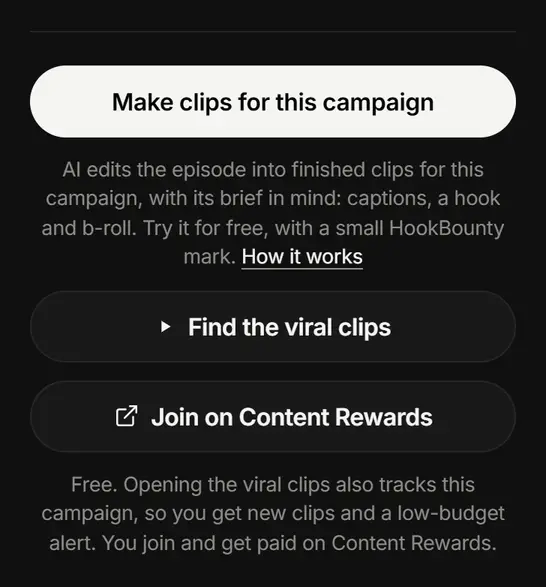
- Make clips for this campaign. AI clips of the campaign's video.
- Find the viral clips. Every viral clip we've found for this campaign.
On the creator's page
Each creator page shows the campaigns paying to clip them and the most-viewed clips across all of those campaigns, live and ended.
Creators with a live campaign right now: Lacy, Lainey Wilson, Jake Paul, Double Coverage, The Weeknd, DiegoLoveless, IShowSpeed, Oz Ali. All of them.
In the apps
Search the creator's name and their show's name on YouTube, TikTok and Instagram and open the clips with the most views. Clip pages often put the creator's nickname in the title, so search that too. Some campaigns also link example clips in their brief: those are the clearest sign of what the campaign approves.
How to use a viral clip as a reference
- Write down its first line, and how many seconds it takes to get there.
- Note the length, the caption style, and whether it uses b-roll or a split screen.
- Read the top comments. They say what people reacted to, which is usually the moment, not the edit.
- Find a different moment that works the same way, and cut it yourself. How to pick a moment and open a clip.
Never repost a viral clip
Reposting someone else's clip, or re-cutting the same moment the same way, is reused content. TikTok's guidelines keep unoriginal content out of the For You feed, YouTube treats reused content as ineligible for its Partner Program, and campaigns reject it. A clip of a creator who pays clippers is fine; a copy of another clipper's clip is not. Why clips get 0 views covers originality and reach.
A viral clip shows what worked once. Nobody can promise yours will do the same.
Questions
Can I repost a viral clip I found?
No. Reposting someone else's clip, or re-cutting the same moment the same way, is reused content: apps hold it back and campaigns reject it. Use viral clips as references for your own cut of a different moment.
What does climbing fastest mean?
The clips gaining views quickest right now, as opposed to the biggest of all time. They show what works for a creator this week.
Why does a campaign have no viral clips yet?
Either it's new, or nobody has made its format work. A new campaign can be a chance to be first; an old one with nothing is a warning sign.
How we checked this guide. The screens are a live HookBounty campaign page. Top clips come from the campaign's platform where it publishes them, plus YouTube, TikTok, Instagram and X posts we find for the creator. The rules on reused content are TikTok's and YouTube's own.
By HookBounty. We never promise views, approval or pay, and no campaign pays us to be listed.